


QuiltLab API and MCP: Choose a Route for Your Task
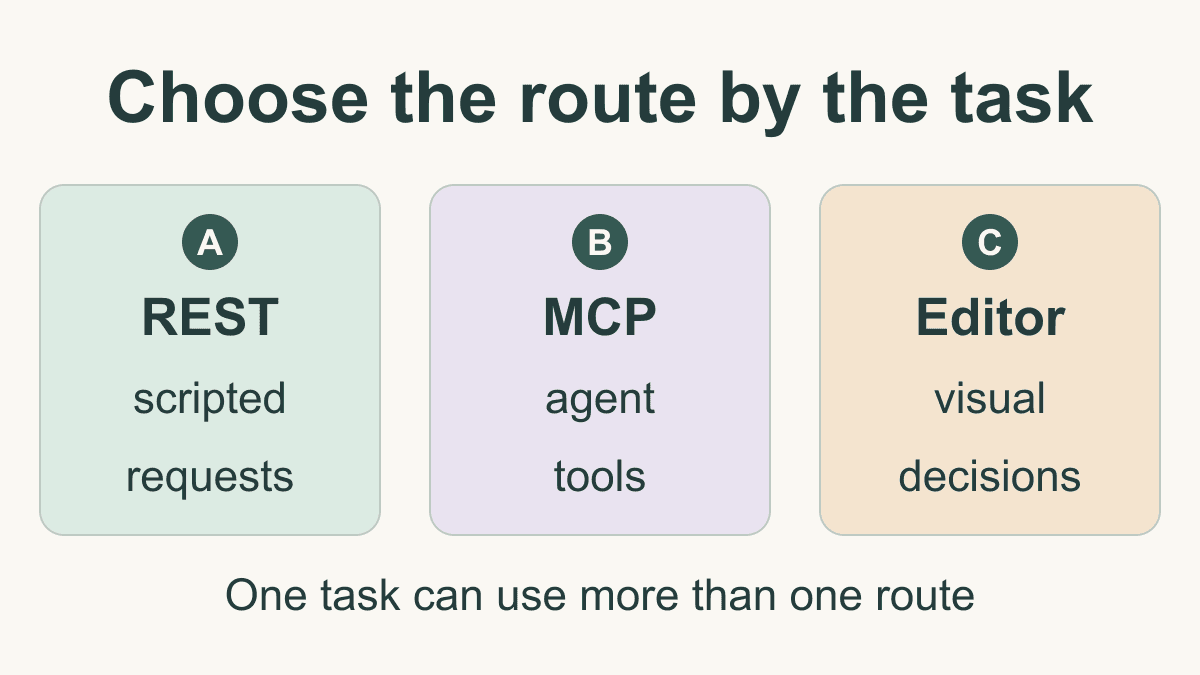
Choose an interface by the task you need to complete. The QuiltLab API can supply structured information and links to saved work; MCP exposes documented operations as tools for a compatible agent client. The editors remain the place for detailed visual design decisions.
A small integration often uses more than one of those routes. For example, a script can retrieve a supply reference, while a person follows its guide link and evaluates whether it fits their project. This guide offers a decision map and an original handoff record. For request syntax and connection instructions, use the developer getting-started guide and MCP connection guide.
Choose who controls the next operation
Start by writing the desired result in one sentence. "Find a fabric-brand guide" needs a read. "Create a personal block to work on later" needs authorization and a write. "Adjust the pieces until the composition looks right" belongs in an editor.
Use this map to choose the next step:
| Reader's task | Route to consider | What controls the next step |
|---|---|---|
| Repeat a known lookup with fixed inputs | REST | Your script chooses the request and checks the response |
| Ask an agent to choose among documented tools | MCP | The client presents tools and manages their invocation |
| Judge or change a visual composition | QuiltLab editor | You inspect the design and make editing decisions |
| Resume a saved item after a lookup | REST or MCP, then editor | The returned item link becomes the handoff |
REST is useful when you want an explicit sequence: set the parameters, send the request, validate the result and decide what comes next. MCP is useful when an agent client needs to discover named tools and use their input schemas during a conversation. Neither choice removes the need to understand the operation's result.
The OpenAPI Initiative describes OpenAPI as a specification for HTTP APIs. It describes requests and responses in a shareable format. In QuiltLab, the API reference is generated from the published contract, so use it to check parameters rather than guessing them from a conversational request.
The MCP tools specification describes named tools with schemas that models can invoke. The client determines how those tools appear and how you control their use. For a workflow that can create records, choose a client whose operation controls you understand before enabling those writes.
Separate public references from personal work
QuiltLab's developer overview and REST-to-tool map describe the current surface. Public catalog and supply tools can be used anonymously. Operations for projects and saved designs require authorization. The authentication guide documents the OAuth flow; v1 does not issue QuiltLab API keys.
This distinction should shape an integration. A public supply lookup can begin without access to your account. A request concerning your saved work needs a deliberate account connection. Do not treat successful public browsing as evidence that personal reads or writes are authorized.
For the specific supply operation used below, the REST operation ID is browseSupplies, and its MCP tool name is browse_supplies. They are two published ways to reach that operation. The map also documents exceptions: the REST authentication probe has no MCP tool equivalent. Check the actual map for each task rather than assuming that every route has a matching tool.
A public read verified against the running service
On October 12, 2026, we made one anonymous REST request to GET /api/v1/supplies with these parameters:
category:fabric-brandsquery:modalimit:1
No account cookie or authorization token was sent. The service returned HTTP 200 and a JSON response with success: true. The observed data included:
| Field | Observed value | Meaning for this task |
|---|---|---|
| category | fabric-brands | The requested reference category |
| items | One item | One result returned for this request |
| item name | Moda Fabrics Bella Solids | The guide entry's name |
| item slug | moda-fabrics-bella-solids | The entry identifier |
The returned guide URL opened the Moda Fabrics Bella Solids reference page. That completes a small, useful task: retrieve an entry, retain its identifier and give the reader a place to inspect the reference.
The result is a reference lookup. It does not establish current shop stock, a match to fabric you own or a complete inventory of Moda fabrics. The observation verifies this one public REST read at that time. We did not use it to test an MCP client connection, authenticated access or a design creation operation.
To reproduce the request with the current command and response format, follow Make your first request. Keep your own response record: requested category and query, timestamp, HTTP result, returned identifier and guide URL. Recheck the live result when it matters to a later decision.
Write a handoff record before creating anything
A handoff record describes the goal, evidence and next action so that a later step does not mistake a partial result for a finished design. Here is an original example for someone who has completed the public lookup above and is considering personal design work:
| Record field | Example entry |
|---|---|
| Goal | Review a fabric-brand reference, then plan a new block |
| Completed evidence | Anonymous supply read returned one guide entry |
| Retained reference | moda-fabrics-bella-solids and its guide URL |
| Personal operation | Not performed; account authorization still needed |
| Design records | No project or block created in this example |
| Next decision | Read the reference, then decide whether to begin a block in the editor |
Notice that the record preserves a real completed read and leaves future work explicit. It does not contain a fabricated block ID or imply that a fabric was assigned to a piece. A teammate can resume the research without duplicating records that were never needed.
If you later choose an authorized creation workflow, add the returned IDs and URLs as each operation succeeds. Record the specific input and outcome, not merely "design started." Use the published workflow guide to see which operations the sequence actually performs.
The documented create-project workflow starts an empty project. The start-block workflow creates an empty block with no pieces and returns a Block Editor link. The start-design sequence creates a project and block, then searches the shared fabric catalog; it does not attach the block to the project or assign fabrics to pieces. Those distinctions tell you what remains for the person continuing in QuiltLab.
Resume partial work without duplicating it
The published workflows describe separate operations, not one atomic transaction. If a later step fails, an earlier create may already have succeeded. A handoff therefore needs the last confirmed result and any uncertain result, as well as the intended next step.
Suppose a future integration receives a successful project result but loses the connection during block creation. Record the project ID and URL. Mark the block outcome uncertain, then inspect existing state before deciding whether another create is needed. Do not label the whole attempt unsuccessful and automatically replay every write. This is a hypothetical recovery example, not a failure we induced during the public-read check.
The errors and retries guide describes the current error responses and recovery advice. In an integration, distinguish an invalid input that needs correction from a temporary failure, and distinguish a definite failure from a write whose outcome is unknown. Keep credentials out of logs and handoff notes; store the result information needed to resume work instead.
Continue the visual decisions in QuiltLab
Use the returned editor link when a documented read or creation operation supplies one. It identifies the work to continue. Keep the Block Editor guide or Quilt Editor guide beside that next step, depending on the item being opened.
Opening an editor is a handoff, not proof of a construction-ready quilt. Review the actual geometry, dimensions, fabric assignments and instructions relevant to your design. A supply reference, an empty block or a successful API response cannot establish that sewing quantities are correct or that a pattern has been tested.
For a first integration, choose one bounded result you can verify. A public read with a checked response is a useful starting point. Add account access and creation only when the next task requires them, and carry each confirmed ID, link and unfinished decision forward to the editor.
Related posts

AI Quilt Design: Describe, Review and Edit in QuiltLab
Follow a real QuiltLab assistant prompt through proposal review, saved editing and SVG export, then independently check the square-patch construction math.

QuiltLab Update: What the Editors Can Do Today (and a Correction)
A correction to an earlier feature announcement, with verified editor capabilities, measurement limits and the difference between saving and sharing.
How to Sell Quilt Patterns: Package and Delivery
Prepare a clear pattern listing, a versioned download package and a delivery check, with a plan for access, support and corrections.