


Why Is Your Rotary Cutter Skipping Threads?

If your rotary cutter leaves connected threads or needs more force than usual, stop and check it instead of pressing harder. OLFA's FAQ identifies skipped threads and increased cutting effort as signs that a blade needs replacing. There is no useful universal replacement date: what matters is how the blade is cutting and whether the cutter is assembled correctly.
A few threads can turn a planned strip into a tugged, distorted edge. Before cutting the next project piece, move to a scrap and work through a short diagnosis. Use the instructions for the exact cutter model; a familiar-looking handle can have a different blade-change mechanism.
Stop the cut and close the guard
Don't pull the fabric apart to make the skipped threads break. Keep your hands clear of the exposed blade, stop the cutting motion and close the guard before setting the cutter down. Clear the area so the scrap, ruler and mat can lie flat.
OLFA's safe-cutting guidance advises cutting away from your body, keeping fingers inside the ruler edge and closing the blade before putting the tool down. Follow those directions during the check as well as during the quilt cutting.
If the tool or guard is damaged or you cannot make it operate as its instructions describe, stop using it and contact the maker. A scrap test doesn't make a damaged cutter safe.
Identify the cutter before opening anything
For a concrete reference, consider the OLFA RTY-2/G straight-handle 45 mm cutter. Its current product page identifies the included blade as RB45-1 and describes the sliding guard. That reference applies to this model, not every 45 mm rotary cutter.
Find the model on your own handle or packaging and open its matching instructions. If yours has a different handle, use the maker's page for that handle. Matching only the blade diameter misses the assembly details that let the blade rotate and the guard work.
Keep the instructions beside the tool before a blade change. Prepare the replacement and the maker-recommended safe disposal method for the used blade. If the illustrated parts or their order do not make sense, get the maker's help rather than guessing.
Separate three questions
Skipped threads do not prove one cause. They tell you that the cut isn't separating the fabric cleanly. Ask these questions in order so that a harder push doesn't hide the problem.
| Question | Safe next check | What to record |
|---|---|---|
| Is this the correct blade and assembly for the model? | Compare with its exact illustrated instructions | Model, blade ID and any uncertainty |
| Is the blade cutting effectively? | Replace it when the maker's symptom guidance calls for it | Date and reason for replacement |
| Is the cutting setup sound? | Check mat condition, support and a flat scrap | Surface and scrap used |
OLFA's FAQ also discusses poor blade rotation, debris and accidentally having two blades together. Those are reasons to check the exact instructions or contact support. Don't run fingers along an edge or try to separate stuck blades by hand.
Avoid adding lubricant, sharpening the blade or improvising a tightening adjustment as a general remedy. OLFA doesn't recommend sharpening its rotary blades, and the right assembly procedure depends on the model.
Use the actual blade-change illustrations
OLFA's Classic Rotary Cutter blade-change page links illustrated instructions specifically for RTY-2/G and RTY-3/G. Read the complete linked sheet, including the washer orientation and the warning against overtightening. Refer to the photographs as well as the text.
We haven't reproduced an assembly diagram here. Its small parts and orientation are exactly where a generic drawing could mislead. If the part names or instructions are unclear, pause and ask OLFA about your exact model before proceeding.
After a correctly completed change, check the guard and operation as the manufacturer directs. Keep the old blade out of the work area and dispose of it safely. Only then move to a clean scrap test.
Make a repeatable scrap check
Use one piece of ordinary project scrap, a stable self-healing mat and the same ruler you plan to use. Keep the layers and material suitable for the cutter's instructions. Don't test a fresh blade first on a valuable panel or a stack whose lower layers you cannot inspect.
For the record below, mark three 4-inch test paths on separate parts of the scrap. Label the paths A, B and C on paper, rather than placing fingers near the blade to mark a fault. Cut only as directed for the tool, with normal controlled handling. Stop the check if it still requires extra force.
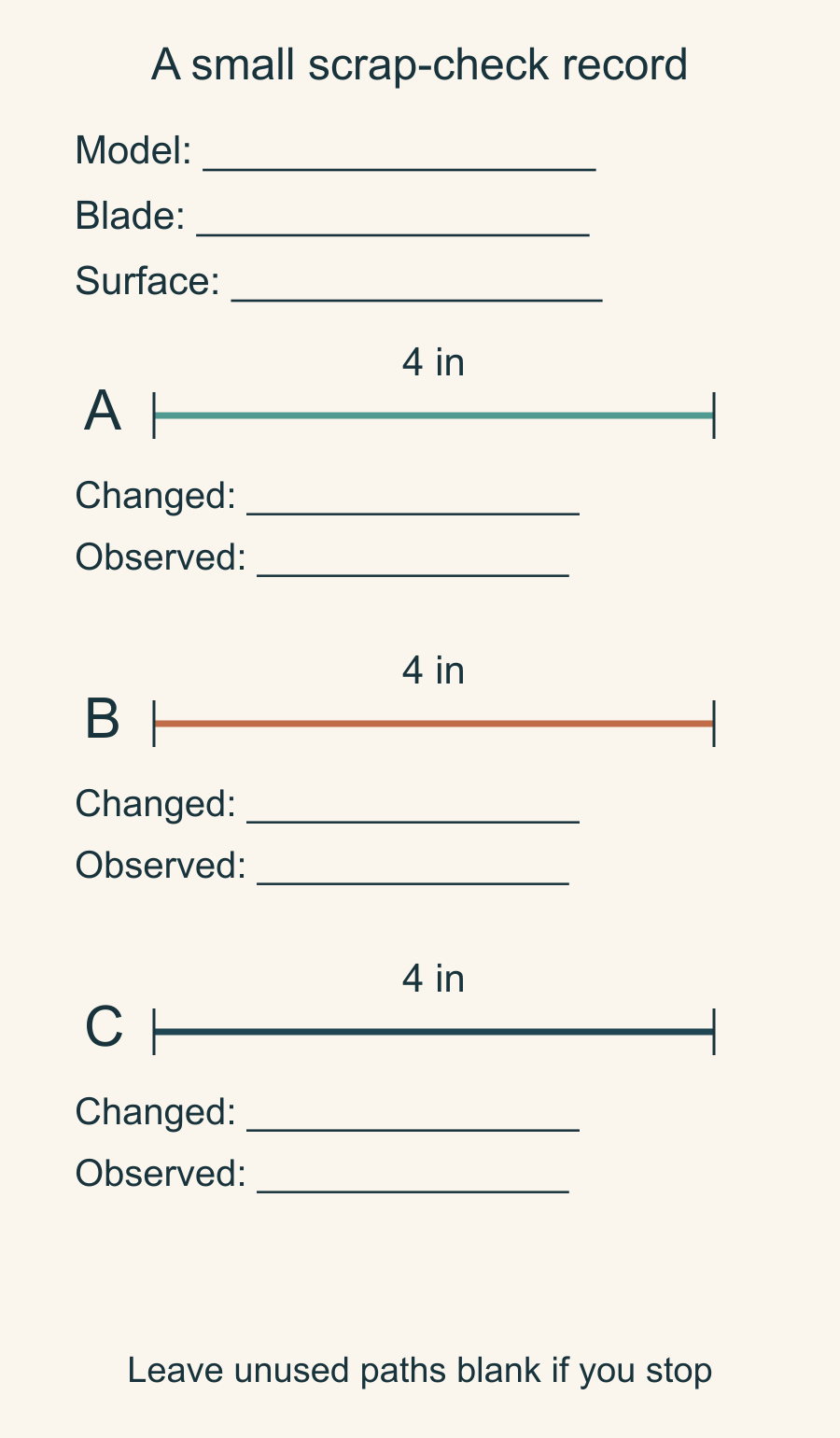
The three paths give you room for a first observation, a check after an appropriate correction, and a repeat. They aren't a requirement to keep cutting with a tool that is performing poorly.
| Path | What changed before this cut? | What happened? |
|---|---|---|
| A | Record the starting model and setup | Write whether threads remained; don't pull the edge |
| B | One supported correction, if needed | Describe the actual separation and cutting effort |
| C | Repeat the corrected setup, if safe | Check whether the result repeats |
Twelve inches of marked path is enough to organize this small record: three paths multiplied by 4 inches. It isn't a blade-life test. Leave unused paths blank if you stop to replace a blade or seek help.
Check the mat as a separate part of the system
A poorly supported mat or a repeatedly used groove can make a cutting setup harder to assess. Follow your mat maker's care directions, put it on a sound surface and inspect the area where the scrap will lie. Change the cutting location when appropriate rather than working the same groove indefinitely.
Record that change as a separate step. If you replace the blade, move the mat and change the fabric stack all at once, a clean cut won't tell you which problem was present.
Once the scrap separates cleanly with the correct setup and normal handling, inspect the last project piece you cut. Compare it with your pattern before returning it to the stack. Our beginner quilting supplies guide covers the broader cutting kit; this small record belongs beside the instructions for the cutter you actually use.
Related posts

Basting a Quilt on a Small Table, One Section at a Time
Keep a pinned overlap while you move the layers. Follow a five-position plan for a 48 x 60-inch top on a 30 x 40-inch table.

How to Stop a Quilting Ruler Slipping While You Cut
Check the reference edge, ruler line and holding position before cutting another strip. Compare a tapered cut with a consistent width error.
Pin Basting vs Spray Basting: Which Fits Your Quilt and Room?
Pins 3 to 4 inches apart hold until you remove them; spray is faster but lasts only as long as its label says. Choose by quilt size, surface and can.